mirror of
https://github.com/zen-browser/desktop.git
synced 2025-12-24 07:08:52 +00:00
Compare commits
1 Commits
1.12.9b
...
better-sta
| Author | SHA1 | Date | |
|---|---|---|---|

|
cc1e375cd1 |
105
.github/ISSUE_TEMPLATE/bug_report.yml
vendored
105
.github/ISSUE_TEMPLATE/bug_report.yml
vendored
@@ -4,76 +4,35 @@ body:
|
||||
- type: markdown
|
||||
attributes:
|
||||
value: |
|
||||
<p align="center">
|
||||
<a href="https://zen-browser.app">
|
||||
<picture>
|
||||
<source media="(prefers-color-scheme: dark)" srcset="https://raw.githubusercontent.com/zen-browser/desktop/dev/docs/assets/zen-light.svg">
|
||||
<source media="(prefers-color-scheme: light)" srcset="https://raw.githubusercontent.com/zen-browser/desktop/dev/docs/assets/zen-dark.svg">
|
||||
<img src="https://raw.githubusercontent.com/zen-browser/desktop/dev/docs/assets/zen-light.svg" alt="Zen Logo" width="64" height="64">
|
||||
</picture>
|
||||
<img src="https://raw.githubusercontent.com/zen-browser/desktop/dev/docs/assets/zen-browser.svg" alt="Zen Browser Text" width="156" height="64">
|
||||
</a>
|
||||
</p>
|
||||
Thank you for filing a bug report!
|
||||
|
||||
<p align="center"><em>Thank you for filing a bug report!</em></p>
|
||||
|
||||
> [!IMPORTANT]
|
||||
> - Please provide descriptive titles. Bad titles do more harm than good.
|
||||
> - Please search existing issues to avoid creating duplicates.
|
||||
> - For enhancement requests, please use GitHub Discussions.
|
||||
> - Please fill out the template below to the best of your ability.
|
||||
> - Please describe the issue as much as possible and provide steps to reproduce it along with visual aids if possible.
|
||||
## IMPORTANT READ
|
||||
- Please provide descriptive titles. Bad titles do more harm than good.
|
||||
- Please search existing issues to avoid creating duplicates.
|
||||
- For enhancement requests, please use GitHub Discussions.
|
||||
- Please fill out the template below to the best of your ability.
|
||||
- Please describe the issue as much as possible and provide steps to reproduce it along with visual aids if possible.
|
||||
- type: checkboxes
|
||||
id: captchas
|
||||
attributes:
|
||||
label: Preliminary Checks
|
||||
description: Please confirm the following before submitting a bug report. This helps us triage and resolve issues more efficiently.
|
||||
label: Captchas
|
||||
description: Just making sure you did actually read the instructions.
|
||||
options:
|
||||
- label: I have read and understood the important section above.
|
||||
required: true
|
||||
- label: I have read the instructions.
|
||||
- label: I have searched existing issues and avoided creating duplicates.
|
||||
required: true
|
||||
- label: I am not filing an enhancement request.
|
||||
required: true
|
||||
- label: I have checked that this issue cannot be reproduced on Mozilla Firefox.
|
||||
required: true
|
||||
- label: I have checked that this issue can be reproduced once I removed all my Mods and Custom CSS.
|
||||
required: true
|
||||
validations:
|
||||
required: true
|
||||
- type: textarea
|
||||
id: what-happened
|
||||
attributes:
|
||||
label: What happened?
|
||||
description: Describe the bug clearly and concisely.
|
||||
description: Also tell us, what did you expect to happen?
|
||||
placeholder: Tell us what you see!
|
||||
validations:
|
||||
required: true
|
||||
- type: input
|
||||
id: expected-behavior
|
||||
attributes:
|
||||
label: Expected behavior
|
||||
description: Please write a description of what was supposed to happen.
|
||||
validations:
|
||||
required: true
|
||||
- type: input
|
||||
id: actual-behavior
|
||||
attributes:
|
||||
label: Actual behavior
|
||||
description: Please write a description of what actually happened.
|
||||
validations:
|
||||
required: true
|
||||
- type: textarea
|
||||
id: how-to-reproduce
|
||||
attributes:
|
||||
label: Steps to reproduce
|
||||
description: Please Provide numbered steps to reproduce this issue so developers can replicate them easily.
|
||||
validations:
|
||||
required: true
|
||||
- type: textarea
|
||||
id: screenshots
|
||||
attributes:
|
||||
label: Screenshots and videos
|
||||
description: |
|
||||
If applicable, add screenshots or videos to help explain your problem.
|
||||
- type: input
|
||||
id: version
|
||||
attributes:
|
||||
@@ -93,8 +52,8 @@ body:
|
||||
- Linux (Tarball)
|
||||
- macOS - aarch64
|
||||
- macOS - Intel
|
||||
- Windows - aarch64
|
||||
- Windows - x64
|
||||
- Windows - aarch64
|
||||
- Other
|
||||
validations:
|
||||
required: true
|
||||
@@ -104,26 +63,26 @@ body:
|
||||
label: What component is this issue related to?
|
||||
options:
|
||||
- Other
|
||||
- Bookmarks
|
||||
- Compact Mode
|
||||
- Customizable UI / Toolbars
|
||||
- Extensions
|
||||
- Glance
|
||||
- Keyboard Shortcuts
|
||||
- Localization
|
||||
- Media Controler
|
||||
- Mods / Themes
|
||||
- Performance
|
||||
- Privacy
|
||||
- Security
|
||||
- Settings
|
||||
- Split View
|
||||
- Sync
|
||||
- Tab Folders
|
||||
- Tab unloading
|
||||
- Tabs
|
||||
- URL Bar
|
||||
- Workspaces
|
||||
- Mods / Themes
|
||||
- Glance
|
||||
- URL Bar
|
||||
- Tabs
|
||||
- Split View
|
||||
- Settings
|
||||
- Privacy
|
||||
- Performance
|
||||
- Media Controler
|
||||
- Tab unloading
|
||||
- Tab Folders
|
||||
- Keyboard Shortcuts
|
||||
- Security
|
||||
- Extensions
|
||||
- Customizable UI / Toolbars
|
||||
- Localization
|
||||
- Bookmarks
|
||||
- Sync
|
||||
validations:
|
||||
required: true
|
||||
|
||||
|
||||
117
README.md
117
README.md
@@ -7,7 +7,7 @@
|
||||
[](https://crowdin.com/project/zen-browser)
|
||||
[](https://github.com/zen-browser/desktop/actions/workflows/build.yml)
|
||||
|
||||
Zen is a firefox-based browser with the aim of pushing your productivity to a new level!
|
||||
✨ Experience tranquillity while browsing the internet with Zen! Our mission is to give you a balance between speed, privacy and productivity!
|
||||
|
||||
<div flex="true">
|
||||
<a href="https://zen-browser.app/download">
|
||||
@@ -27,13 +27,118 @@ Zen is a firefox-based browser with the aim of pushing your productivity to a ne
|
||||
</a>
|
||||
</div>
|
||||
|
||||
### Firefox Versions
|
||||
## 🖥️ Compatibility
|
||||
|
||||
- [`Release`](https://zen-browser.app/download) - Is currently built using Firefox version `139.0.1`! 🚀
|
||||
- [`Twilight`](https://zen-browser.app/download?twilight) - Is currently built using Firefox version `RC 139.0.1`!
|
||||
Zen is currently built using Firefox version `139.0`! 🚀
|
||||
|
||||
### Contributing
|
||||
- [`Zen Twilight`](https://zen-browser.app/download?twilight) - Is currently built using Firefox version `RC 139.0`!
|
||||
- Check out the latest [release notes](https://zen-browser.app/release-notes)!
|
||||
- Part of our mission is to keep Zen up-to-date with the latest version of Firefox, so you can enjoy the latest features and security updates!
|
||||
|
||||
If you'd like to report a bug, please do so on our [GitHub Issues page](https://github.com/zen-browser/desktop/issues/) and for feature requests, you can use [Github Discussions](https://github.com/zen-browser/desktop/discussions).
|
||||
## 🤝 Contribution
|
||||
|
||||
Zen is an open-source project, and we welcome contributions from the community! Please take a look at the [contribution guidelines](./docs/contribute.md) before getting started!
|
||||
|
||||
### Issue metrics
|
||||
|
||||
We keep track of how many issues are closed at the end of the month in [docs/issue-metrics](./docs/issue-metrics). We use this to keep track of our issues and see our progress! 📈
|
||||
|
||||
### Versioning
|
||||
|
||||
Zen uses [Semantic Versioning](https://semver.org/), meaning versions are displayed as `a.b.cd` where:
|
||||
|
||||
- `a` is the major version
|
||||
- `b` is the minor version
|
||||
- `c` is the branch prefix
|
||||
- `d` is the patch version
|
||||
|
||||
### Branches
|
||||
|
||||
Zen is divided into 2 main branches. We use `dev` for development and `stable` for stable releases. The `dev` branch is where all the new features are added and where `twilight` builds are generated. The `stable` branch is where the stable releases are generated.
|
||||
|
||||
We divide into 2 branches in case there's any really important security update (for example) that needs to be released before the next stable release. This allows us to do patches without releasing unstable versions to the public.
|
||||
|
||||
## 📥 Installation
|
||||
|
||||
### Supported Operating Systems
|
||||
|
||||
Zen is available for Linux, macOS, and Windows. You can download the latest version from the official website at [zen-browser.app](https://zen-browser.app/download), or from the [GitHub Releases](https://github.com/zen-browser/desktop/releases) page.
|
||||
|
||||
If you don't see your OS listed below, that's because we already have it in our [downloads page](https://zen-browser.app/download)! Make sure to check it out!
|
||||
|
||||
#### Windows
|
||||
|
||||
##### Winget
|
||||
|
||||
```ps
|
||||
winget install --id Zen-Team.Zen-Browser
|
||||
```
|
||||
|
||||
#### macOS
|
||||
|
||||
- Requires macOS 10.15 or later
|
||||
- Available for ARM and Intel architectures
|
||||
|
||||
You can also install Zen using Homebrew:
|
||||
|
||||
```
|
||||
brew install zen-browser
|
||||
```
|
||||
|
||||
#### Linux
|
||||
|
||||
##### Arch-based distributions
|
||||
|
||||
```sh
|
||||
yay -S zen-browser-bin
|
||||
```
|
||||
|
||||
##### Other Linux distributions (Tarball or AppImage)
|
||||
|
||||
- `Tarball` install:
|
||||
|
||||
```sh
|
||||
bash <(curl -s https://updates.zen-browser.app/install.sh)
|
||||
```
|
||||
|
||||
- `AppImage` install:
|
||||
|
||||
```sh
|
||||
bash <(curl https://updates.zen-browser.app/appimage.sh)
|
||||
```
|
||||
|
||||
> AppImage install requires `zsync` for the Update feature
|
||||
|
||||
- Again, if you don't see your OS listed above, that's because we already have it in our [downloads page](https://zen-browser.app/download)! 🔄
|
||||
|
||||
To upgrade the browser to a newer version, use the embedded update functionality in `About Zen`.
|
||||
|
||||
## 👨💻 Development and Contributing
|
||||
|
||||
Some components used by @zen-browser as an attempt to make Firefox forks a better place, and for other to enjoy the beauty of OSS. You can find them [here](https://github.com/zen-browser/desktop/tree/dev/src/zen).
|
||||
|
||||
#### `Run Locally`
|
||||
|
||||
In order to download and run Zen locally, please follow [these instructions](https://docs.zen-browser.app/guides/building).
|
||||
|
||||
#### `Special Thanks`
|
||||
|
||||
Special thanks to... EVERYONE 🎉! Checkout the team and contributors page [here](https://zen-browser.app/about)
|
||||
|
||||
#### `Third Party Code`
|
||||
|
||||
Zen couldn't be in its current state without the help of these amazing projects! 🙏
|
||||
|
||||
- Zen's default preferences are based on [BetterFox](https://github.com/yokoffing/Betterfox)
|
||||
- Gradient image extracted from [Arc Palette](https://github.com/neurokitti/Arc_Palette)
|
||||
- `icons.css` has been modified from [Edge Firefox](https://github.com/bmFtZQ/edge-frfox) (MIT licensed file).
|
||||
|
||||
### 🖥️ Comparison with other browsers
|
||||
|
||||
Thanks everyone for making Zen stand out among these giants!
|
||||
|
||||
[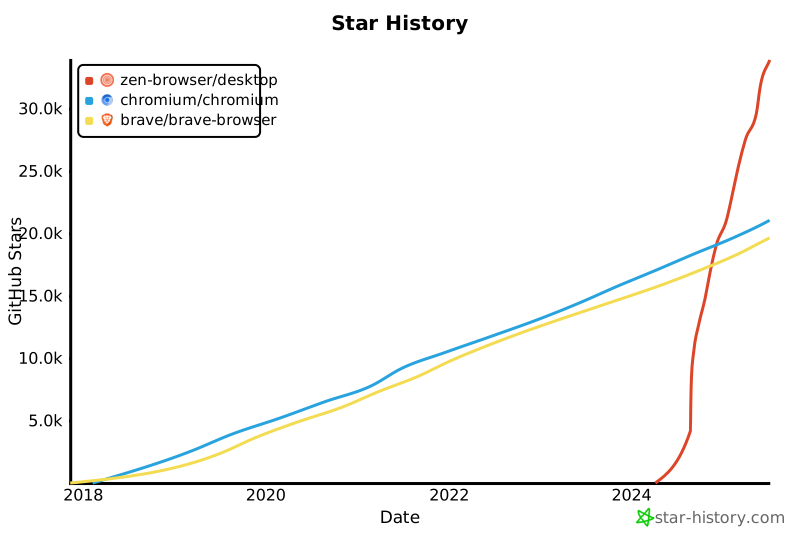](https://star-history.com/#zen-browser/desktop&chromium/chromium&brave/brave-browser&Date)
|
||||
|
||||
## 📄 License
|
||||
|
||||
Zen browser is under the [MPL 2.0 LICENSE](./LICENSE). All the code is open-source and free to use! Attribution is appreciated but not required.
|
||||
|
||||
@@ -1 +1 @@
|
||||
6548d6b52a8969b347101142ed630393332ab274
|
||||
da30619f3ea895b356ded705b8dff9e4f271198f
|
||||

@@ -1,19 +0,0 @@
|
||||
<svg xmlns="http://www.w3.org/2000/svg" viewBox="0 0 156 64" height="64" width="156">
|
||||
<defs>
|
||||
<style>
|
||||
.label {
|
||||
font-size: 1.5rem;
|
||||
font-family: sans-serif;
|
||||
font-weight: 700;
|
||||
text-align: center;
|
||||
fill: #1f1f1f;
|
||||
}
|
||||
@media (prefers-color-scheme: dark) {
|
||||
.label {
|
||||
fill: #d1cfc0;
|
||||
}
|
||||
}
|
||||
</style>
|
||||
</defs>
|
||||
<text class="label" y="38" x="5">Zen Browser</text>
|
||||
</svg>
|
||||
|
Before Width: | Height: | Size: 454 B |
2
l10n
2
l10n
Submodule l10n updated: d0ffb8e391...ebecb32da8
@@ -36,3 +36,6 @@ pref("network.http.rcwn.enabled", false);
|
||||
// Strategy to use for bytecode cache (Thanks https://github.com/gunir)
|
||||
pref('dom.script_loader.bytecode_cache.strategy', 2);
|
||||
pref("layout.css.grid-template-masonry-value.enabled", true);
|
||||
|
||||
// No Proxy should be default, Use system proxy allows antivirus, virus or system proxy to MITM or slowing down Zen
|
||||
pref("network.proxy.type", 0);
|
||||
|
||||
@@ -1,13 +1,14 @@
|
||||
diff --git a/toolkit/themes/shared/menulist-shared.css b/toolkit/themes/shared/menulist-shared.css
|
||||
index 5dd5549674570170a694afbd9ea4526e52e3192a..a24ded413065ce1493e8622c5777c5b5bdac128e 100644
|
||||
index 5dd5549674570170a694afbd9ea4526e52e3192a..187fcb57183df6a0ab3701ab79c46d86c5e984b3 100644
|
||||
--- a/toolkit/themes/shared/menulist-shared.css
|
||||
+++ b/toolkit/themes/shared/menulist-shared.css
|
||||
@@ -14,7 +14,7 @@
|
||||
@@ -14,7 +14,8 @@
|
||||
|
||||
:host(:not([native])) {
|
||||
appearance: none;
|
||||
- background-color: var(--button-background-color);
|
||||
+ background-color: light-dark(rgba(0,0,0,.1), rgba(255,255,255,.1));
|
||||
+ background-color: var(--zen-colors-tertiary, ButtonFace);
|
||||
+ border: 1px solid var(--input-border-color, ThreeDShadow);
|
||||
color: var(--button-text-color);
|
||||
border-radius: 4px;
|
||||
padding-block: 4px;
|
||||
|
||||
@@ -3,8 +3,6 @@
|
||||
// file, You can obtain one at http://mozilla.org/MPL/2.0/.
|
||||
{
|
||||
var ZenStartup = {
|
||||
_watermarkIgnoreElements: ['zen-browser-background'],
|
||||
|
||||
init() {
|
||||
this.openWatermark();
|
||||
this._initBrowserBackground();
|
||||
@@ -109,10 +107,9 @@
|
||||
closeWatermark() {
|
||||
document.documentElement.removeAttribute('zen-before-loaded');
|
||||
if (Services.prefs.getBoolPref('zen.watermark.enabled', false)) {
|
||||
let elementsToIgnore = this._watermarkIgnoreElements.map((id) => '#' + id).join(', ');
|
||||
gZenUIManager.motion
|
||||
.animate(
|
||||
'#browser > *:not(' + elementsToIgnore + '), #urlbar, #tabbrowser-tabbox > *',
|
||||
'#browser > *, #urlbar, #tabbrowser-tabbox > *',
|
||||
{
|
||||
opacity: [0, 1],
|
||||
},
|
||||
|
||||
@@ -26,7 +26,7 @@
|
||||
}
|
||||
}
|
||||
|
||||
:root[zen-before-loaded='true'] #browser > *:not(#zen-browser-background),
|
||||
:root[zen-before-loaded='true'] #browser > *,
|
||||
:root[zen-before-loaded='true'] #urlbar {
|
||||
opacity: 0 !important;
|
||||
}
|
||||
|
||||
@@ -263,10 +263,6 @@ panel {
|
||||
--arrowpanel-menuitem-padding-inline: 15px;
|
||||
}
|
||||
|
||||
menuseparator {
|
||||
padding-inline: 0 !important;
|
||||
}
|
||||
|
||||
toolbarseparator,
|
||||
menuseparator {
|
||||
border-width: var(--zen-panel-separator-width);
|
||||
@@ -334,7 +330,7 @@ menuseparator {
|
||||
|
||||
#zen-toast-container {
|
||||
position: fixed;
|
||||
--zen-toast-spacing: max(4px, var(--zen-element-separation));
|
||||
--zen-toast-spacing: max(8px, calc(var(--zen-element-separation) * 2));
|
||||
top: var(--zen-toast-spacing);
|
||||
z-index: 1000;
|
||||
display: flex;
|
||||
@@ -396,7 +392,7 @@ menuseparator {
|
||||
& button {
|
||||
color-scheme: dark;
|
||||
width: min-content;
|
||||
padding: 0 10px !important;
|
||||
padding: 0 12px !important;
|
||||
min-width: unset !important;
|
||||
margin: 0px !important;
|
||||
border-radius: calc(var(--zen-native-inner-radius) + 2px) !important;
|
||||
@@ -416,3 +412,29 @@ menuseparator {
|
||||
padding: 0 !important;
|
||||
min-width: unset !important;
|
||||
}
|
||||
|
||||
#statuspanel {
|
||||
&:not([hidden]) {
|
||||
bottom: 6px;
|
||||
left: 6px;
|
||||
}
|
||||
|
||||
&:not([mirror]):-moz-locale-dir(rtl),
|
||||
&[mirror]:-moz-locale-dir(ltr) {
|
||||
left: auto;
|
||||
right: 6px;
|
||||
}
|
||||
|
||||
& #statuspanel-label {
|
||||
background: color-mix(in srgb, var(--zen-colors-primary) 80%, #0f0f0f 20%) !important;
|
||||
border-radius: 99px !important;
|
||||
padding: 3px 7px;
|
||||
font-weight: 600;
|
||||
color: white;
|
||||
border: none !important;
|
||||
outline: 1px solid rgba(255, 255, 255, 0.2);
|
||||
font-size: small;
|
||||
outline-offset: -1px;
|
||||
box-shadow: 0 0 1px 1px rgba(0, 0, 0, 0.1);
|
||||
}
|
||||
}
|
||||
|
||||
@@ -197,8 +197,6 @@
|
||||
--toolbar-field-background-color: var(--zen-colors-input-bg) !important;
|
||||
--arrowpanel-background: var(--zen-dialog-background) !important;
|
||||
|
||||
--panel-separator-color: color-mix(in srgb, currentColor 15%, transparent) !important;
|
||||
|
||||
--zen-big-shadow: 0 0 9.73px 0px light-dark(rgba(0, 0, 0, 0.15), rgba(0, 0, 0, 0.25));
|
||||
--zen-active-tab-scale: 0.98;
|
||||
|
||||
|
||||
@@ -91,10 +91,6 @@ var gZenCompactModeManager = {
|
||||
this.preference === value ||
|
||||
document.documentElement.hasAttribute('zen-compact-animating')
|
||||
) {
|
||||
if (typeof this._wasInCompactMode !== 'undefined') {
|
||||
// We wont do anything with it anyway, so we remove it
|
||||
delete this._wasInCompactMode;
|
||||
}
|
||||
// We dont want the user to be able to spam the button
|
||||
return value;
|
||||
}
|
||||
@@ -103,7 +99,6 @@ var gZenCompactModeManager = {
|
||||
// main-window can't store attributes other than window sizes, so we use this instead
|
||||
lazyCompactMode.mainAppWrapper.setAttribute('zen-compact-mode', value);
|
||||
document.documentElement.setAttribute('zen-compact-mode', value);
|
||||
Services.xulStore.persist(lazyCompactMode.mainAppWrapper, 'zen-compact-mode');
|
||||
this._updateEvent();
|
||||
return value;
|
||||
},
|
||||
|
||||
@@ -152,7 +152,6 @@
|
||||
border-radius: calc(var(--zen-native-inner-radius) + var(--zen-element-separation) / 4);
|
||||
@media -moz-pref('zen.view.compact.color-sidebar') {
|
||||
background: var(--zen-main-browser-background-toolbar) !important;
|
||||
background-attachment: fixed !important;
|
||||
background-size: 2000px !important;
|
||||
@media -moz-pref('zen.theme.acrylic-elements') {
|
||||
backdrop-filter: blur(42px) saturate(110%) brightness(0.25) contrast(100%) !important;
|
||||
|
||||
@@ -93,9 +93,19 @@
|
||||
if (!iconUrl && tab.hasAttribute('zen-pin-id')) {
|
||||
try {
|
||||
setTimeout(async () => {
|
||||
const favicon = await this.getFaviconAsBase64(tab.linkedBrowser.currentURI);
|
||||
if (favicon) {
|
||||
gBrowser.setIcon(tab, favicon);
|
||||
try {
|
||||
await this.promisePinnedCacheInitialized;
|
||||
const pin = this._pinsCache?.find(
|
||||
(pin) => pin.uuid === tab.getAttribute('zen-pin-id')
|
||||
);
|
||||
let favicon = await PlacesUtils.favicons.getFaviconForPage(
|
||||
Services.io.newURI(pin.url)
|
||||
);
|
||||
if (favicon) {
|
||||
gBrowser.setIcon(tab, favicon.dataURI);
|
||||
}
|
||||
} catch (error) {
|
||||
console.warn('Error getting favicon URL:', error);
|
||||
}
|
||||
});
|
||||
} catch {}
|
||||
@@ -641,7 +651,8 @@
|
||||
return faviconData.dataURI;
|
||||
} catch (ex) {
|
||||
console.error('Failed to get favicon:', ex);
|
||||
return null;
|
||||
// console.error("Failed to get favicon:", ex);
|
||||
return `page-icon:${pageUrl}`; // Use this as a fallback
|
||||
}
|
||||
}
|
||||
|
||||
|
||||
@@ -1314,15 +1314,15 @@
|
||||
|
||||
/* Style background */
|
||||
& .tab-background {
|
||||
border-radius: var(--border-radius-medium) !important;
|
||||
transition: background 0.1s ease-in-out;
|
||||
border-radius: var(--border-radius-medium) !important; /* Use medium radius */
|
||||
transition: background 0.1s ease-in-out; /* Smooth background transition */
|
||||
}
|
||||
|
||||
--tab-selected-bgcolor: light-dark(rgba(255, 255, 255, 0.85), rgba(255, 255, 255, 0.2));
|
||||
|
||||
&:not([visuallyselected], [multiselected='true']) .tab-background {
|
||||
background: var(--zen-toolbar-element-bg);
|
||||
border: none;
|
||||
background: var(--zen-toolbar-element-bg); /* Use generic element background */
|
||||
border: none; /* No border */
|
||||
}
|
||||
|
||||
& .tab-content {
|
||||
|
||||
@@ -6,13 +6,8 @@
|
||||
var _tabsToPin = [];
|
||||
var _tabsToPinEssentials = [];
|
||||
|
||||
const kZenElementsToIgnore = ['zen-browser-background'];
|
||||
|
||||
function clearBrowserElements() {
|
||||
for (const element of document.getElementById('browser').children) {
|
||||
if (kZenElementsToIgnore.includes(element.id)) {
|
||||
continue;
|
||||
}
|
||||
element.style.display = 'none';
|
||||
}
|
||||
}
|
||||
@@ -271,15 +266,11 @@
|
||||
document.getElementById('zen-welcome').remove();
|
||||
document.documentElement.removeAttribute('zen-welcome-stage');
|
||||
for (const element of document.getElementById('browser').children) {
|
||||
if (kZenElementsToIgnore.includes(element.id)) {
|
||||
continue;
|
||||
}
|
||||
element.style.opacity = 0;
|
||||
element.style.removeProperty('display');
|
||||
}
|
||||
gZenUIManager.updateTabsToolbar();
|
||||
let elementsToIgnore = kZenElementsToIgnore.map((id) => `#${id}`).join(', ');
|
||||
await animate(`#browser > *:not(${elementsToIgnore})`, { opacity: [0, 1] });
|
||||
await animate('#browser > *', { opacity: [0, 1] });
|
||||
gZenUIManager.showToast('zen-welcome-finished');
|
||||
}
|
||||
|
||||
|
||||
@@ -207,8 +207,8 @@
|
||||
}
|
||||
|
||||
#zen-welcome-initial-essentials-browser {
|
||||
min-width: 70%;
|
||||
min-height: 80%;
|
||||
width: 70%;
|
||||
height: 80%;
|
||||
display: flex;
|
||||
margin-left: auto;
|
||||
margin-top: auto;
|
||||
@@ -282,7 +282,7 @@
|
||||
--border-radius-medium: 1rem;
|
||||
|
||||
&[visuallyselected] {
|
||||
transform: scale(1.06);
|
||||
transform: scale(1.04);
|
||||
}
|
||||
|
||||
& .tab-background::after {
|
||||
|
||||
@@ -2134,21 +2134,6 @@ var gZenWorkspaces = new (class extends ZenMultiWindowFeature {
|
||||
repeat: 0,
|
||||
});
|
||||
essentialsContainer.parentNode.appendChild(essentialsClone);
|
||||
for (let i = 0; i < essentialsClone.children.length; i++) {
|
||||
const child = essentialsClone.children[i];
|
||||
const originalChild = essentialsContainer.children[i];
|
||||
if (!gBrowser.isTab(child) || !gBrowser.isTab(originalChild)) {
|
||||
continue;
|
||||
}
|
||||
const childBg = child.querySelector('.tab-background');
|
||||
const originalChildBg = originalChild.querySelector('.tab-background');
|
||||
if (childBg && originalChildBg) {
|
||||
childBg.style.setProperty(
|
||||
'--zen-tab-icon',
|
||||
originalChildBg.style.getPropertyValue('--zen-tab-icon')
|
||||
);
|
||||
}
|
||||
}
|
||||
}
|
||||
}
|
||||
document.documentElement.setAttribute('animating-background', 'true');
|
||||
|
||||
@@ -5,8 +5,8 @@
|
||||
"binaryName": "zen",
|
||||
"version": {
|
||||
"product": "firefox",
|
||||
"version": "139.0.1",
|
||||
"candidate": "139.0.1"
|
||||
"version": "139.0",
|
||||
"candidate": "139.0"
|
||||
},
|
||||
"buildOptions": {
|
||||
"generateBranding": true
|
||||
|
||||
Reference in New Issue
Block a user